Short answer: When we checked on 27 November 2026, none of the four sites people most often search for alongside Kracensoft (kracensoft.com, mimshacks.com, aelftech.com and droven.io) presented itself as a software download site. Kracensoft sat behind a Cloudflare security check; Mimshacks showed gaming statistics articles; Aelftech described itself as a digital marketing agency; and Droven.io was an AI and technology blog.
Whatever a site looks like, the safest rule for software is simple: download only from the developer’s official website or an official app store or package manager, check the file is digitally signed, and never override a security warning for a program you found through an unfamiliar link.
I will be straight with you: names like Kracensoft and Mimshacks turn up in search suggestions next to words like “download”, “software” and “free”, and it is natural to wonder whether they are safe places to get programs. So we looked at each site, checked its public records and history, and then put together the guide we wish everyone read before clicking a download button on a site they have never heard of. You will learn what each site actually showed on the day we checked, how to research any unfamiliar domain in five minutes, and the habits that keep your computer safe.

What we found on each site
We visited each home page on 27 November 2026, looked up its registration record and checked the Wayback Machine for earlier versions. Here is a neutral summary of what we saw.
| Site | Registered | What the home page showed (27 Nov 2026) |
|---|---|---|
| kracensoft.com | 12 April 2024 | A Cloudflare “Just a moment…” security check, so we could not see the content directly |
| mimshacks.com | 5 February 2019 | Articles on gaming statistics and Google’s “Do a barrel roll” trick, plus a “Write for us” page |
| aelftech.com | 10 August 2023 | A digital marketing agency page offering SEO, PPC and WordPress services, plus a “Write for us” page |
| droven.io | Not shown in the public record we checked | A WordPress blog about AI, technology and digital transformation |
Kracensoft
The earliest Wayback Machine snapshot we found, from April 2024 (the month the domain was registered), showed only a Russian-language hosting placeholder reading “Congratulations, the site has been created!” By June 2025 the archived home page carried the title “Kracen Soft – Exploring Tomorrow’s Tech Today” and showed technology articles, such as a piece on widgets for macOS Sonoma and an app review. On our visit the live site returned a Cloudflare challenge page, which is a common bot-protection screen and not in itself a sign of anything good or bad.
Mimshacks
Mimshacks has changed identity more than once. A May 2020 snapshot described it as “Quick access to online solutions, Mauritius”, with listings for cars and property. By June 2022 the title had become “Marketing Solutions to Help SMEs Succeeding online!” On our visit it showed gaming statistics articles and several pages about Google’s “Do a barrel roll” Easter egg, with About, Contact and “Write for us” pages.
Aelftech and Droven.io
Aelftech.com presented itself as a digital marketing agency for US businesses, listing SEO, pay-per-click management, social media and WordPress development services. Droven.io was a WordPress technology blog with articles on AI tools, ChatGPT and digital transformation. Both, along with a fifth site often searched in the same breath, nemin.io (a small-business tools and calculators site), resolved to the same server IP address when we checked. Shared IP addresses are extremely common on shared and managed hosting, so this tells you nothing about who runs a site; we mention it only because it is the kind of thing you may notice when researching domains yourself.
The takeaway: on the day we checked, none of these sites presented itself as a place to download software. If a search result or a link suggests otherwise, treat it with caution and go to the software developer’s own website instead.
Why people search for unfamiliar download sites
Most people who end up on an unknown download site are looking for one of three things: a free version of paid software, an old version of a program that is no longer offered, or a quick fix such as a driver or a utility. Search engines surface many sites for those queries, and some of them are not what they seem. Others are perfectly legitimate blogs that simply rank for software-related phrases. The problem is that it is hard to tell the difference at a glance.
The real risks of downloading from the wrong place
| Risk | What it looks like | Why it matters |
|---|---|---|
| Malware | An installer that also drops a trojan, info-stealer or ransomware | Can steal passwords, banking details and files |
| Bundled extras | Installers that add toolbars, “optimisers” or browser changes | Slows your computer and may track your browsing |
| Fake download buttons | Adverts styled as large green “Download” buttons | Leads to a different file than the one you wanted |
| Tampered files | A genuine program repackaged with extra code | Looks normal while running something hidden |
| Outdated versions | Old builds with known security holes | Easier for attackers to exploit |
| Legal exposure | Cracked or pirated copies of paid software | Copyright infringement, plus the malware risks above |
Security researchers also reported a wave of “malvertising” in late 2022 and early 2023, where criminals bought search adverts impersonating popular free programs. The adverts led to convincing copies of official download pages that delivered malware. The lesson is that even a result at the very top of a search page can be fake, so it pays to check the web address carefully or type the developer’s address yourself.
The safest places to get software
| Source | Examples | Why it is safer |
|---|---|---|
| Developer’s official site | mozilla.org for Firefox, libreoffice.org, videolan.org for VLC | You get the genuine, current version directly |
| Official app stores | Microsoft Store, Apple App Store and Mac App Store, Google Play | Apps are reviewed and signed; updates are automatic |
| Package managers | winget on Windows, Homebrew on macOS, apt, dnf or Flatpak on Linux | Pulls from known sources and can verify files automatically |
| Open-source repositories | Official GitHub releases pages linked from the project’s site | Public code and release history |
| Your device maker | Driver pages from your laptop, graphics card or printer manufacturer | Drivers matched to your hardware |
Microsoft’s Windows Package Manager (winget), which reached version 1.0 in 2021, lets you install many popular programs from the command line. For example, typing winget install Mozilla.Firefox in a terminal installs Firefox from its official source. Mac users can do something similar with Homebrew, and most Linux distributions are built around package managers.
How to check a file before you run it
Verifying a checksum, step by step
Many developers publish a SHA-256 checksum next to their downloads. It is a long string of letters and numbers that acts like a fingerprint: if even one byte of the file changes, the checksum changes completely. To check it:
| System | Command to run |
|---|---|
| Windows (PowerShell) | Get-FileHash .\filename.exe -Algorithm SHA256 |
| Windows (Command Prompt) | certutil -hashfile filename.exe SHA256 |
| macOS | shasum -a 256 filename.dmg |
| Linux | sha256sum filename.tar.gz |
If the two strings match, the file is the one the developer published. If they do not, delete it. One caution: a checksum only helps if you get it from the official site, because a fake download page can publish a matching checksum for its own tampered file.
Understanding security warnings
Modern operating systems try to stop you running dangerous files. On Windows, Microsoft Defender SmartScreen checks downloaded programs against a reputation service and warns you about unknown or unsafe ones. On a Mac, Gatekeeper checks that apps come from identified developers and have been notarised by Apple. Browsers such as Chrome, Edge and Firefox also block downloads they recognise as harmful.
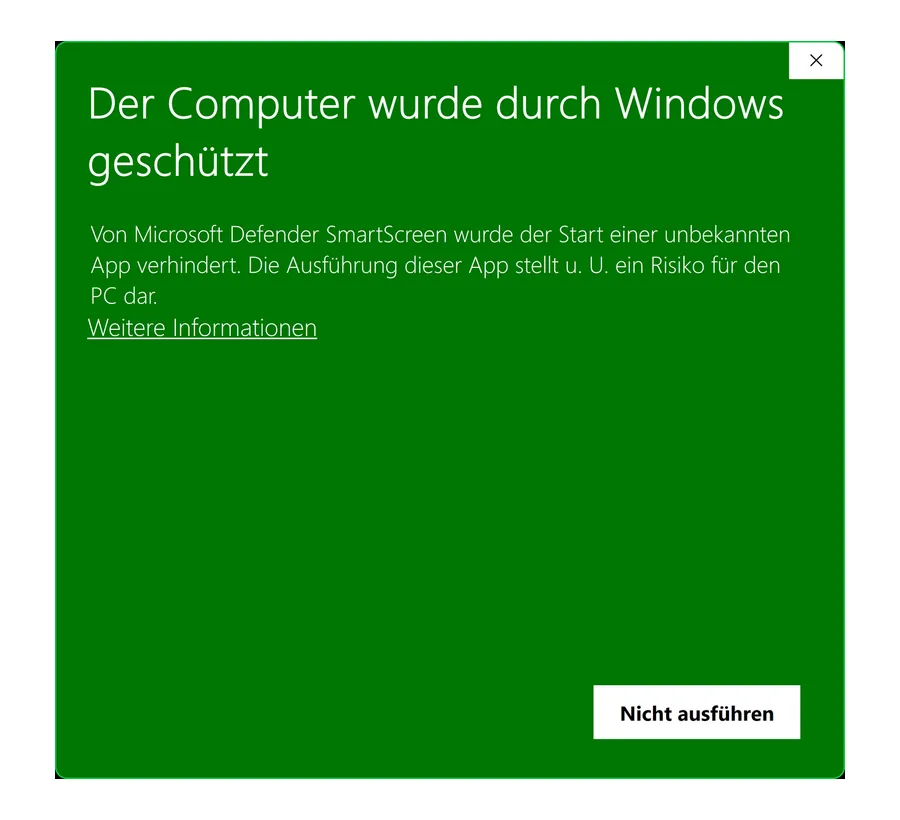
These warnings are not perfect, and genuine new software from small developers sometimes triggers them. But if you downloaded a file from a site you do not know, and your computer warns you about it, the sensible choice is to stop, delete the file and look for an official source.
How to research any unfamiliar website in five minutes
You do not need special skills to check out a site. These are the same steps we used for this article, and they work for any domain.
| Check | How | What it can tell you |
|---|---|---|
| Registration date | Search “RDAP lookup” and enter the domain | A very new domain offering big promises deserves extra caution |
| History | Enter the address at web.archive.org | Whether the site has changed purpose or owner over time |
| About and contact | Look for a real organisation, address and named people | Accountability; anonymous sites are harder to trust |
| Reviews and reputation | Search the site name plus “scam” or “review” | What other people have experienced |
| Safety reputation | Check the address with Google Safe Browsing’s site status tool | Whether it is flagged for malware or phishing |
| The link itself | Hover over download buttons before clicking | Whether the file comes from the site or somewhere else |
This is a version of what fact-checkers call “lateral reading”: rather than judging a site by how it looks, you open new tabs and see what the rest of the web says about it. We cover the technique in more detail in our guide to fact-checking knowledge sites.
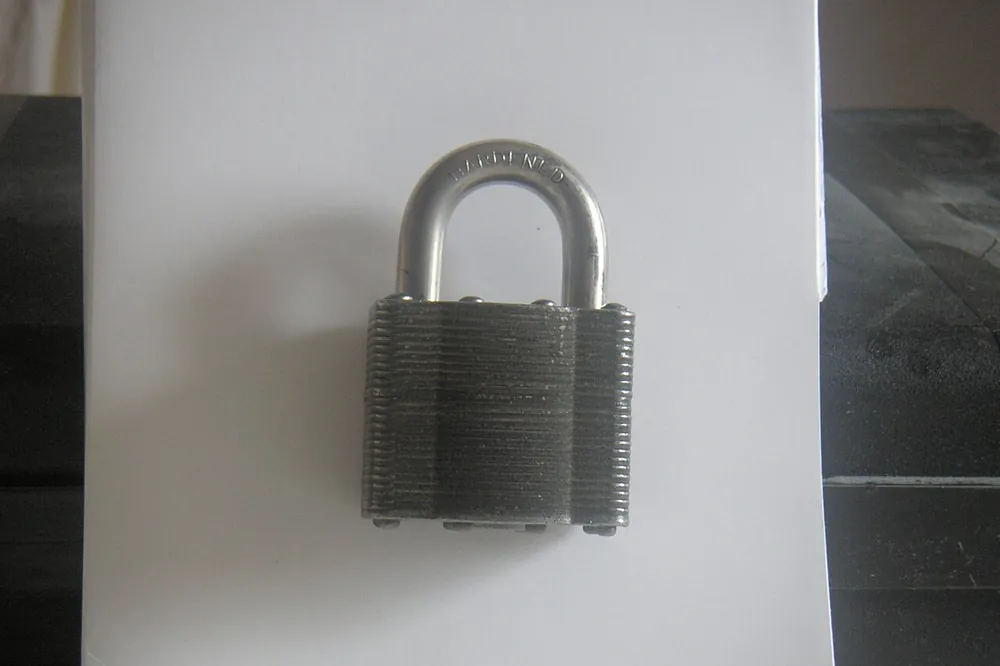
A common misunderstanding is that the padlock in the address bar means a site is safe. It only means the connection between you and the site is encrypted with HTTPS. Free certificates are available to anyone, including scam sites, so the padlock tells you nothing about whether the files on offer are genuine.
Free and legal alternatives to paid software
One of the main reasons people visit dubious download sites is to avoid paying for software. In many cases there is a free, legal alternative that does the job well.
| If you need | Free, legal options |
|---|---|
| Office documents | LibreOffice, or free web versions of Microsoft 365 and Google Docs |
| Photo editing | GIMP, Krita, Photopea (web) |
| Video editing | DaVinci Resolve (free edition), Shotcut, Kdenlive |
| 3D modelling | Blender |
| Audio editing | Audacity |
| PDF reading and signing | Built-in browser PDF viewers, Adobe Acrobat Reader (free) |
| Antivirus on Windows | Microsoft Defender, built into Windows |
| Disk space analysis | WizTree or WinDirStat |
Many paid programs also offer free trials, student discounts or cheaper subscriptions. These are far better options than a cracked copy, which carries a real risk of malware and is illegal in the UK, US and most other countries. We explain those risks in depth in our article on the risks of cracked software.

What to do if you have already run something suspicious
- Disconnect the computer from the internet to stop any data being sent out.
- Run a full scan with your antivirus, such as Microsoft Defender’s full scan or offline scan.
- Uninstall the program and any unfamiliar programs or browser extensions installed at the same time.
- Change your passwords from a different, clean device, starting with email and banking, and turn on two-factor authentication.
- Watch your accounts for unusual activity, and contact your bank straight away if you see any.
- Get help from a reputable repair service if problems continue. In the UK you can report fraud to Action Fraud; in the US, to the FBI’s Internet Crime Complaint Center (IC3).
If the computer holds important files, make sure you have a backup on an external drive or cloud service that was not connected at the time. Ransomware can encrypt anything it can reach.
A quick safety checklist
| Do | Do not |
|---|---|
| Download from the developer’s official site or an official store | Download from a site you found through a random link or advert |
| Check the digital signature and, where offered, the checksum | Run files with unexpected types, such as a “video” ending in .exe |
| Keep Windows, macOS and your browser updated | Turn off antivirus to get an installer to run |
| Use a standard (non-administrator) account for daily use | Click through SmartScreen or Gatekeeper warnings for unknown files |
| Untick bundled offers during installation | Accept every “recommended” option without reading |
For related advice on judging websites before you trust them, see our guides to SEO tools that promise instant results and guest-post platforms.
More from our Tech section: image search techniques, the 785 area code, SEO tools that promise instant results, how to judge business advice blogs, vetting startup advice sites, fact-checking knowledge sites, finding reliable legal information online, anonymous Instagram story viewers, guest-post platforms explained, the risks of cracked software, free movie streaming site risks.
Frequently asked questions
Is kracensoft.com a software download site?
When we checked on 27 November 2026 it showed a Cloudflare security check. An archived version from June 2025 showed a technology blog titled “Kracen Soft – Exploring Tomorrow’s Tech Today”, not a download library.
What is Mimshacks?
On our visit it showed gaming statistics articles and pages about Google’s “Do a barrel roll” trick. Archived versions show it previously described itself as a Mauritius listings site (2020) and an SME marketing service (2022).
What is Aelftech?
Its home page described a digital marketing agency offering SEO, PPC and WordPress services for US businesses.
What is Droven.io?
A WordPress blog about AI, technology and digital transformation, based on our visit on 27 November 2026.
Where is the safest place to download software?
The developer’s official website, an official app store, or a trusted package manager such as winget, Homebrew or your Linux distribution’s repositories.
How can I tell if a downloaded file is genuine?
Check its digital signature in the file properties and compare its SHA-256 checksum with the one published on the developer’s official site.
Does the padlock icon mean a download site is safe?
No. It only means the connection is encrypted. Scam sites can use HTTPS too.
Should I ignore a SmartScreen warning?
Not for files from unfamiliar sites. Delete the file and get the software from an official source instead.
Is downloading cracked software illegal?
Copying paid software without a licence is copyright infringement in the UK, US and most countries, and cracked files are a common source of malware.
What should I do if I installed something suspicious?
Disconnect from the internet, run a full antivirus scan, uninstall the program, change passwords from a clean device and monitor your accounts.
Final thoughts
Kracensoft, Mimshacks, Aelftech and Droven.io turned out to be a mixed group of blogs, a marketing agency and a site behind a security check, not software libraries, at least on the day we looked. The bigger lesson applies to any unfamiliar site: get software from the people who make it, verify what you download, and treat security warnings as a reason to stop rather than an obstacle to click past.
Sources: Our own visits to kracensoft.com, mimshacks.com, aelftech.com, droven.io and nemin.io and their public RDAP registration records (27 November 2026); Internet Archive Wayback Machine snapshots of kracensoft.com (April 2024, June 2025) and mimshacks.com (May 2020, June 2022); Microsoft documentation on Defender SmartScreen, Windows Package Manager and Get-FileHash; Apple documentation on Gatekeeper and notarisation; Google Safe Browsing. Images: Wikimedia Commons, credited in each caption.